
Summarize this article with AI(click one of the models and ctrl+v)





Why a chatbot — and why now
Voice handles the urgent. Chat handles the rest.
A building manager who notices a fault at 11pm might not want to call — but they'll send a message. A client chasing a service update might prefer to type it. A tenant logging a recurring issue for the second time this week wants to do it quickly, from their phone, without being put on hold. These are real interactions, happening every day, that fall through the cracks of a voice-only setup.
The conventional answer is a chatbot — but most of the chatbots deployed in property and FM contexts are little more than a decision tree with a chat bubble. They ask you to pick from a menu, loop back if you go off-script, and hand you a form to fill in. They don't actually know anything about the building, the company's SOPs, or the specific services on offer. They're rigid because they have to be: they were never connected to real information in the first place.
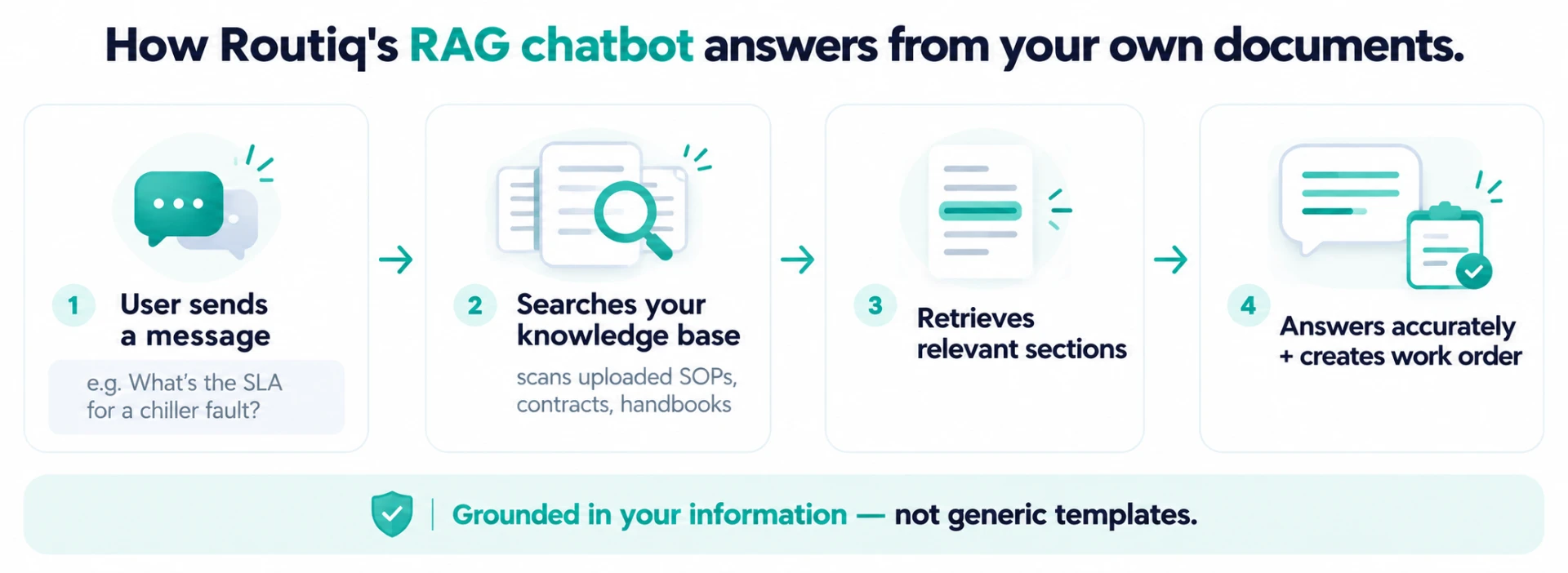
Routiq's chatbot is built differently. It's powered by a retrieval-augmented generation (RAG) knowledge base that you populate with your own documents — and it answers from those, not from a generic template.
The RAG knowledge base: answers from your own information
RAG stands for retrieval-augmented generation. The short version: instead of the AI guessing or generating answers from general training data, it searches your uploaded documents first, retrieves the most relevant sections, and builds its answer from what's actually there. Your information. Your SOPs. Your service scope. Your building details.
In practice, that means you upload files — maintenance schedules, service contracts, building handbooks, equipment lists, FAQ documents, escalation protocols — and the chatbot is grounded in them. When a tenant asks whether the gym is open on public holidays, it doesn't guess. It looks it up and answers from the management handbook you uploaded. When a facility manager asks what the SLA is for a P2 HVAC fault, it reads from the contract document you've filed in the knowledge base.
What you can upload
| File type | Example use |
|---|---|
| PDF / Word documents | Building handbooks, SOPs, maintenance schedules |
| Service contracts | SLA terms, scope of work, escalation procedures |
| Equipment manuals | Asset details, fault codes, maintenance intervals |
| FAQ documents | Tenant FAQs, client onboarding docs, common enquiries |
| Internal process guides | Dispatch rules, contractor lists, access protocols |
The knowledge base is yours to manage. Add files, update them, remove outdated versions — the chatbot's answers update accordingly. No developer needed, no retraining cycle.
Conversational, not scripted: what that actually means
This is the part worth dwelling on, because "AI chatbot" has come to mean something very specific in most people's experience: a bot that asks you to choose option 1, 2 or 3, breaks if you type something unexpected, and apologises when it can't help.
Routiq's chatbot doesn't work like that. There's no decision tree. No fixed menu. No "sorry, I didn't understand that, please choose from the following options."
A user can type naturally — the way they'd message a colleague. Incomplete sentences, casual Cantonese, a question buried inside a longer message — the chatbot understands the intent and responds accordingly. It asks a follow-up if it needs more detail. It clarifies rather than failing. And it responds in a tone that reads like a person wrote it, not like a form was generated.
A few examples of what that looks like in a real FM or property context:
User: The air-con in the boardroom on 12/F has been making a noise since yesterday, not sure if it's urgent
Routiq chatbot: Thanks for flagging. Based on the symptom you've described, I'd classify this as a P2 — not an immediate emergency but worth getting looked at today. I've raised a work order for the HVAC unit on 12/F. The assigned technician will be in touch to confirm the visit time. Anything else you'd like to add to the job?
No menu. No form. One message, one resolution.
The conversational quality matters operationally too — users who get a rigid, unhelpful bot experience stop using the channel and pick up the phone instead, which defeats the purpose. A chatbot that actually helps becomes the preferred first contact, not the thing you try before calling.
From message to work order in one thread
The chatbot doesn't just answer — it acts. When a conversation identifies a fault, a service request, or a maintenance job, it creates a structured work order immediately, without the user having to fill in a separate form or wait for a coordinator to process the message.
The work order captures everything from the conversation: the asset or location, the fault description, the priority classification, any additional context the user provided, and a timestamp. It lands in your job-management or CMMS system the same way a call-generated ticket would — complete, structured, and ready for dispatch.
This is the same closed-loop principle that makes Cantonese voice AI so effective at turning after-hours breakdown calls into dispatched jobs — the value is never in just receiving the report; it's in making sure the report becomes action without a human having to relay it. The chatbot closes that loop for written channels exactly the way the voice AI closes it for phone calls.
For property managers, FM operators, equipment service companies and logistics teams, that means the channel doesn't matter — call or message, the outcome is the same: a structured job, in the system, moving toward resolution.
How it works alongside the Cantonese AI call centre
The chatbot and the voice AI are not competing products. They cover different moments in the same operation.
Voice AI handles the phone — the urgent, the emotional, the complex, and the Cantonese-speaking caller who will always pick up the phone over a chat box. It triages fault calls, dispatches technicians, and answers enquiries in real spoken Hong Kong Cantonese, 24/7. That capability — understanding tonal Cantonese, code-switching and noisy site audio — is not something a chatbot replaces.
The chatbot handles written channels — the tenant who messages at midnight, the client who prefers text, the coordinator logging a non-urgent request through the portal. It's available on web, messaging platforms and client portals, in Cantonese, Mandarin and English.
Together, they give an operation a single, consistent intelligence layer across every inbound channel. The same knowledge base. The same work-order output. The same audit trail. Whether a fault comes in by call or by message, the resolution path looks the same.
What to upload and how to get started
Getting the chatbot running on your operation doesn't require a technical team or a long implementation project. The setup is document-first: you upload the files that describe your operation, and the chatbot starts answering from them.
A practical starting point for most property and FM operations:
- Building or site handbook — hours, access rules, amenity details, contact directories
- Maintenance SLA document — priority tiers, response times, escalation contacts
- Common fault or service FAQ — the questions your team fields every day
- Contractor and equipment list — who handles what, asset IDs, service zones
- Any SOPs your coordinators currently reference — the chatbot can answer from the same documents your team uses
Once uploaded, the chatbot is grounded in them immediately. You can add, update or remove files at any time — no retraining, no developer handoff. As your operation changes, your knowledge base changes with it, and the chatbot's answers stay current.
FAQ
Does the chatbot work in Cantonese?
Yes — it handles written Cantonese, Mandarin and English, including the mixed-language messages that are standard in Hong Kong business communication. A user can write in whichever language they're most comfortable with and the chatbot responds in kind.
What happens if someone asks something that isn't in the knowledge base?
The chatbot acknowledges the gap clearly rather than guessing. It can escalate the conversation to a human, or flag the question as something to add to the knowledge base for next time. It won't fabricate an answer from something it doesn't have.
Can it create work orders in our existing CMMS or job-management system?
Yes, when integrated with your system. Work orders are created as structured records — asset, location, fault description, priority, timestamp — and sent to your platform the same way a phone-generated ticket would be. Integration options are confirmed during onboarding.
Is it a replacement for the Cantonese AI call centre?
No — they serve different channels. The voice AI handles phone calls; the chatbot handles written messages on web, portal and messaging platforms. Most operations benefit from running both, so every inbound channel is covered by the same intelligence layer.
How long does it take to set up?
The core setup — uploading your documents and configuring the chatbot for your channels — is designed to be completed in a single session. The more complete and current your uploaded documents are, the more accurate the chatbot's answers will be from day one.
Can we update the knowledge base ourselves without involving a developer?
Yes. Adding, updating and removing files is self-serve. There's no retraining cycle or technical handoff required — upload a new document and the chatbot's answers update to reflect it.